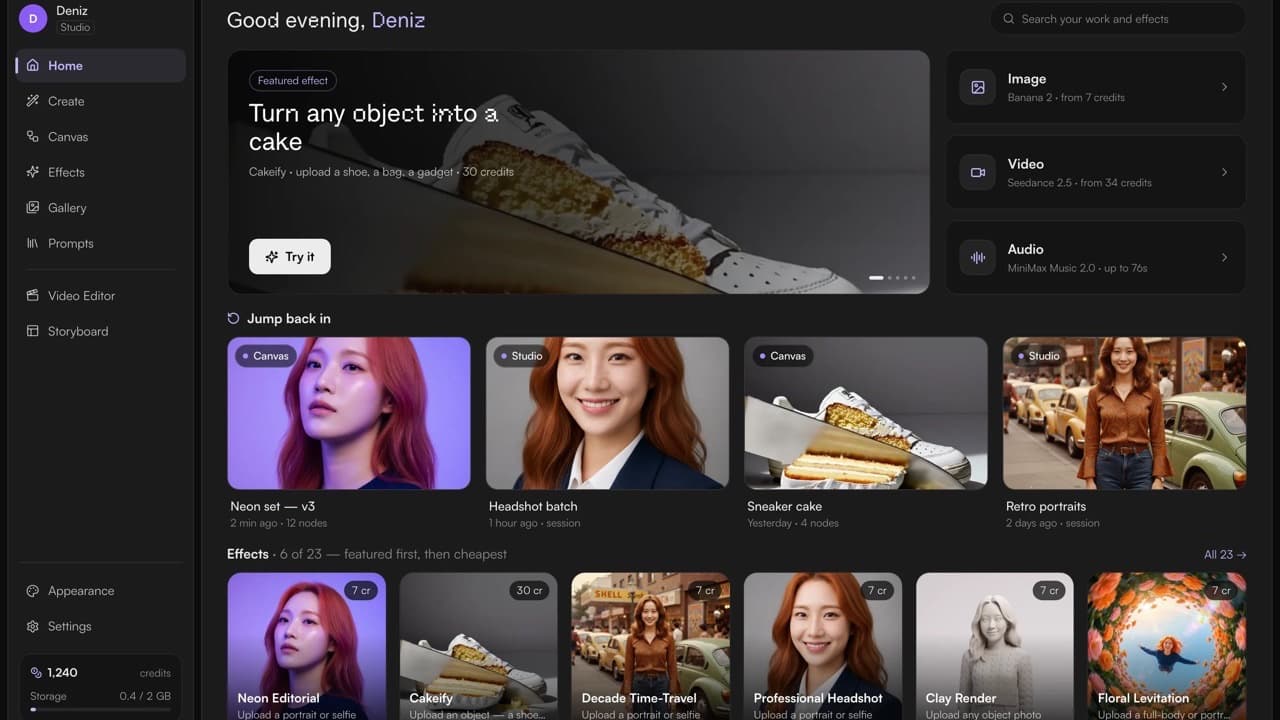
If you tried MoodNode a month ago and bounced off it, the honest reason was probably that the app couldn't tell you what it was for. You landed on a nav menu. Every screen looked like it came from a different product. And the thing most people actually want — pick a look, hand it a photo, get a result — was three clicks deep behind a canvas.
So I spent the last month rebuilding the whole thing.
Short version: the entire app is redesigned (v3 — 212 files, +14,425 / −5,696 lines). Home now shows you what you can make instead of where you can click. The one-tap effects catalogue went from 12 to 23. Six video effects dropped from 240 credits to 30, so seven of the eight video effects now fit inside the 60 free credits a Google sign-up starts with. And there are 14 new models, including MiniMax H3, Seedance 2.5, Seedream 5 Pro and Qwen Image 3.

Start here: video effects got a lot cheaper
This is the change I'd want to know about first, so it goes first.
Six of the video effects were running on Veo 3.1. They're now on Veo 3.1 Lite, and the price went from 240 credits to 30:
| Effect | Before | Now |
|---|---|---|
| Cakeify | 240 credits | 30 credits |
| Squish | 240 credits | 30 credits |
| Meltdown | 240 credits | 30 credits |
| Inflate | 240 credits | 30 credits |
| AI Hug | 240 credits | 30 credits |
| Floating Product | 240 credits | 30 credits |
Signing up with Google starts you at 60 credits. That means seven of the eight video effects are now free to try — the only holdout is Glass Fruit ASMR, which sits at 480 because the engine underneath it genuinely is that expensive and I'd rather price it honestly than quietly downgrade the output.
Across the whole catalogue the prices are now 7, 8, 12, 23, 30, 36 and 480 credits. The cheapest is 7 (Books in Real Life, on Banana 2 Lite). Whatever the number is, it's sitting right next to the Generate button before you press it.
While I was in there I fixed something that had been bothering me: the price chip and the actual generation used to work out the clip length separately. There's now a single function that answers "how long is this clip," and the runner chip, the mobile card and the request body all read it. Seven effects had been declaring a 5-second length their model can't produce — it takes 4, 6 or 8 — so those were corrected too. There's a test pinning it so the two can't drift apart again.
If credits themselves are new to you, the pricing page lays out the packages, and BYOK is still there if you'd rather bring your own provider key and pay providers directly.
The catalogue nearly doubled: 12 → 23 effects
Effects are the one-tap looks — you pick one, drop in a photo, and it does the rest. There were 12 in July. There are 23 now, after an 11-effect pack of physics-morph video and image effects landed.
The runner they open into is new as well. It used to be a page-black panel with four separate aspect-ratio chips, a price pill in two places, and controls at three different heights. Now it's one workbench: a 68px icon rail, the panel on card grey instead of page black, one segmented aspect-ratio track, every control at a uniform 36px, the prompt collapsed by default because most people never touch it, and the credit count moved to sit next to Generate. The duplicate price pill is gone.

Two smaller things in the same area that matter more than they sound:
- Every effect now opens on a picture. 13 of the 23 used to open on an empty "your result appears here" box, which is a terrible way to sell a look. 11 of them ship a cover that is an example of the effect's real output, and the stage falls back to it.
- The runner checks your balance before the click. It was the only generate surface without a balance check — and it's the one the marketing site links straight into. Now the shortfall is priced up front, and the credit modal opens there like it does everywhere else.
A Home that shows the work
The old Home was a launcher. It listed the places you could go: Canvas, Studio, Gallery, Reel, Storyboard. Useful once you already knew what those were, useless on day one.
The new Home is four bands and then the page ends:
- A featured effect, with what it produces and a "Try it".
- Image · Video · Audio — one row, each naming the engine and its credit price, deep-linking into the composer already set up.
- Jump back in — your recent canvases and studio sessions together.
- Effects — six of them with input hints and credit pills, plus a link through to the rest.
The old Home composer got deleted — all 376 lines of it. It was a picture of a control that lives on a different screen: chips you couldn't press, a placeholder you couldn't type into, and a button that navigated somewhere else instead of submitting. Pretending to be a prompt box is worse than not having one.
Effects are now drawn by one shared tile component everywhere they appear, so the same effect looks the same on Home, in the catalogue, and on the marketing site.
The whole app, redesigned
v3 wasn't a theme swap. The pieces that changed:
| Area | What changed |
|---|---|
| Design tokens | One shared set, so a surface can't quietly invent its own grey |
| Create | Canvas and Studio entry merged into one surface |
| List pages | Rebuilt on a shared page header, scroller and empty state |
| Mobile | A real 5-tab shell with safe-area handling — not a squeezed desktop |
| Overlays | Lightbox, credit modal and the rest redrawn to match |
| Buttons | A shape axis applied across 47 call sites |
| Accessibility | Errors announced assertively through a live region; focus traps fixed so keyboard users can actually leave a modal |
| Signed-out shell | Gated rows raise a soft sign-in modal in place — and the modal names the action and its price — instead of replacing the page with a wall you can't escape |
That last one was the single worst thing about the old app. You'd click something interesting while logged out and the page would vanish, replaced by a generic "Welcome" that threw away everything you'd just done. Now it asks in place, and it tells you what you're signing in for.
The whole release went through at 1,219 tests across 113 files, green. Zero database migrations — it's entirely client-side, which is why it could land in one go.
31 effect pages on the site
The marketing site was describing 10 effects while the app offered 23. That's fixed: there are now 31 indexable effect pages at /studio, 24 of them runnable in one tap.
Six of the motion effects play their real output clip — hover on the grid, autoplay in the detail hero — instead of showing a still frame of an object conspicuously not melting. Getting there meant re-encoding the assets: 17.7 MB → 5.6 MB for the effect pages, and the in-app covers went from 18.6 MB to about 1 MB as WebP derivatives.
There's now a CI test that fails the build if the site's effect list and the app's catalogue drift apart in either direction, because that's exactly how the site ended up a year out of date the first time. I also fixed two effects that were advertising a one-tap "Try this Studio" they couldn't deliver, and two that were labelled "coming soon" while being fully runnable.

14 new models
Fourteen new rows landed in the registry since July. Some of those are the same model on a second provider route, and some are family members the app resolves for you from what you plug in, so here are the eight you'll actually pick by name:
| Model | Type | Credits | Best for |
|---|---|---|---|
| MiniMax H3 (Hailuo 3) | Video | 45 @ 5s | Omni-modal video with native stereo audio, 768p, 5–15s. Text-to-video, image-to-video and reference-to-video in one family. |
| Seedance 2.5 | Video | from 180 | Cinematic video up to 30s with native audio and up to 30 image references. |
| Seedream 5 Pro | Image | 10 | Text-to-image flagship — reasoning, 2K, native text in 14 languages. Up to 10 references, 6 outputs. |
| Seedream 5 Pro Edit | Image | 10 | Reference-driven edits at the Pro tier. |
| Qwen Image 3 | Image | 12 | Best-in-class typography and dense layouts. Up to 3 references, 4 outputs. |
| Qwen Image 3 Edit | Image | 12 | Text-accurate edits. |
| VEED Lipsync v2 | Video | 53 @ 5s | Production-quality video-to-video lip sync. |
| Wan S2V | Video | 22 | Image + audio → a talking video with body motion, 480p. |
Video credits are quoted at the model's shortest supported clip length — the number the picker shows before you change anything. Longer clips cost proportionally more.
MiniMax H3 is the one I'd try first. It's a single family that handles text-to-video, image-to-video and reference-to-video, and it generates stereo audio natively rather than having a soundtrack attached afterwards. Seedance 2.5 is the other end of the range: 30-second clips with up to 30 image references, which is a genuinely different kind of tool.
If you want the video models compared head to head, I keep Kling vs. Veo vs. Sora vs. Luma updated as the roster changes.

The awkward part: some models are gone
In July I announced Sora 2, Krea 2 and Luma Ray 3.2. They're no longer in MoodNode.
Sora 2 came out separately. Krea 2 and Luma Ray 3.2 were part of a batch of 32 models retired on 19 August — every one of them had produced zero generations on the platform. The registry went from 173 models to 144: 47 image, 56 video, 5 audio, 21 utility, 15 text.
Every retired ID is mapped to its nearest surviving equivalent, so an old project opens on something that works rather than an error. But I'd rather say it plainly than let you find out from a picker: if you were relying on one of those three, it's gone, and the replacement is a different model. Announcing a model and then removing it is a bad look, and the fix is to be more careful about what goes in — not quieter about what comes out.
The point of the smaller number is that the picker should only list engines that actually run.
Also fixed
- Eight image models were capping the composer at one reference image when their family supports many more. Model families now declare the union of their members' ceilings, so the composer and the canvas agree.
- Slow image generations are no longer reported as failures. The client used to apply one flat wait budget to every image model, which meant the slower ones looked broken when they were just working. Each model's budget now comes from the registry, and "still running" is its own state.
- Paid downloads work again. A cross-origin redirect was silently breaking them.
Go try it
The fastest thing to do: open MoodNode, pick a video effect, and drop in a photo. Cakeify or Squish are the crowd-pleasers, they're 30 credits each, and a Google sign-up starts at 60 — so you can run two of them before any of this costs you anything.
If you're new here and want the wider tour of what the app actually contains, the earlier rundown of Studio, Reel and Storyboard is still the best primer. Everything that shipped, release by release, is on the changelog.
Questions or feedback? Reply to the email, or find me at @buraknevruzoglu — I read everything, and a fair amount of the above exists because someone told me it was bad.
Frequently asked questions
What is MoodNode v3?
MoodNode v3 is a full redesign of the MoodNode app, released on 19 August 2026. It shipped as one release: 212 files changed, 14,425 lines added and 5,696 removed — shared design tokens across every surface, a merged Create surface, rebuilt list pages, redrawn overlays like the lightbox and credit modal, a real 5-tab mobile shell instead of a squeezed desktop layout, and assertive screen-reader announcements for errors. Alongside it, the one-tap effects catalogue grew from 12 to 23 effects and the effect runner was rebuilt as a single workbench.
How many credits does an AI video effect cost in MoodNode?
Most video effects in MoodNode cost 30 credits. Six of them — Cakeify, Squish, Meltdown, Inflate, AI Hug and Floating Product — moved from Veo 3.1 to Veo 3.1 Lite in August 2026 and dropped from 240 credits to 30. Signing up with Google grants 60 free credits, so seven of the eight video effects can be run without paying. Across the whole catalogue, effect prices are 7, 8, 12, 23, 30, 36 and 480 credits, and the exact number is shown next to the Generate button before you spend anything.
What AI models did MoodNode add in August 2026?
Fourteen new model rows since July 2026. The notable ones are MiniMax H3 (Hailuo 3) — omni-modal video with native stereo audio at 768p and 5 to 15 second clips, from 45 credits; Seedance 2.5 — cinematic video up to 30 seconds with native audio and up to 30 image references; Seedream 5 Pro and Seedream 5 Pro Edit — a text-to-image flagship with 2K output and native text in 14 languages, at 10 credits; Qwen Image 3 and Qwen Image 3 Edit for typography and dense layouts at 12 credits; plus two lip-sync utilities, VEED Lipsync v2 and Wan S2V.
Why did MoodNode remove AI models like Sora 2, Krea 2 and Luma Ray 3.2?
MoodNode retired 32 models on 19 August 2026 that had never produced a single generation on the platform, taking the registry from 173 to 144 models. Sora 2 was removed separately. Every retired model ID was mapped to its nearest surviving equivalent, so an older project opens on a model that works instead of showing a "model not available" error. The goal is that the picker only lists engines that actually run.
How many AI models does MoodNode support?
MoodNode currently offers 144 models: 47 image, 56 video, 5 audio, 21 utility and 15 text/LLM. That number went down on purpose in August 2026, when 32 unused models were retired. The in-app model picker is always the authoritative list of what is live, and every model shows its exact credit cost before you generate.
Do I need a subscription to use MoodNode effects?
No. Effects run on the same plans as the rest of MoodNode. You can bring your own provider API key and pay providers directly, or use platform credits with no key management. Signing up with Google grants 60 free credits, which covers seven of the eight video effects and every image effect in the catalogue at least once.